Anmelden
WhatsApp Business Nutzung HubSpot

25 Klicks
Widget para Ventas
¿Cómo puedo ayudarte?
Agency / SEO / Design
25 Klicks
Carlos Vargas
Carlos Vargas
IT / Technology
25 Klicks
Widget for Sales
How can I help you?
IT / Technology
25 Klicks
Widget 1
Use our WhatsApp account for support and sales
25 Klicks
Connaughts
Use our WhatsApp account for support
25 Klicks
Widget for Sales
How can I help you?
Agency / SEO / Design
25 Klicks
Widget 1
Use our WhatsApp account for support and sales
Agency / SEO / Design
25 Klicks
Widget for Bookings
Use MavensTCL's Widget for making bookings
IT / Technology
25 Klicks
captto.com
Solicita información
Agency / SEO / Design
25 Klicks
Irene
Selamat datang, ada yang saya bisa bantu
25 Klicks
Widget para Ventas
¿Cómo puedo ayudarte?
Agency / SEO / Design
24 Klicks
MPF
¿Cómo puedo ayudarte?
Banking / Fintech
Vorherige
1
…
63
64
65
66
(current)
67
68
69
…
137
Nächste
Fügen Sie das Widget auf Ihrer Website hinzu
1. Kopieren Sie diesen Code
Ihr Widget-Code
Code kopieren
In die Zwischenablage kopiert
oder Ihre Schlüsselnummer (
Learn how to add your Widget to your Wordpress website
)
Schlüsselnummer kopieren
In die Zwischenablage kopiert
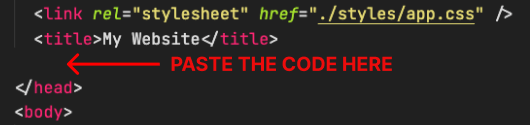
2. Fügen Sie den Code ein
Platzieren Sie den Code direkt vor dem </head>-Tag im HTML Ihrer Website